
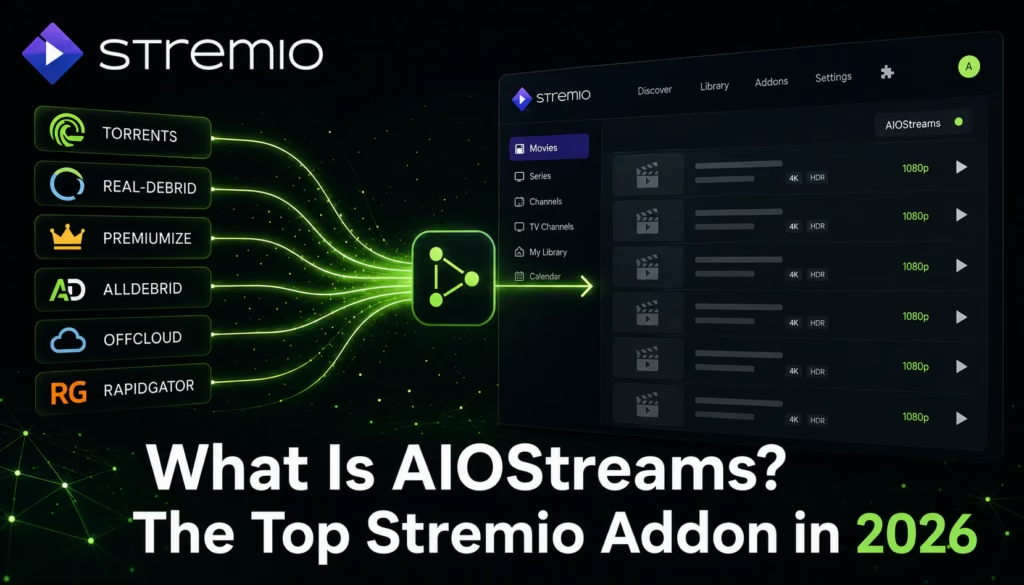
If you use Stremio with a debrid service you have likely seen AIOStreams mentioned in community discussions. In 2026 it has become the most recommended Stremio addon for power users – overtaking Torrentio and Comet in community recommendations. This post explains what AIOStreams actually is, what makes it different from other Stremio addons, how it works with TorBox, and a known issue to be aware of before setting it up.
What Is AIOStreams?
AIOStreams is a meta-addon for Stremio developed by Viren070. Rather than being a single stream source like Torrentio or Comet, AIOStreams sits above multiple addons and queries them simultaneously. It pulls results from several underlying sources in parallel, deduplicates the results, and hands your Stremio client a single consolidated stream list.
The practical effect is that instead of installing five separate Stremio addons and getting duplicate results across all of them, you install AIOStreams once, configure which sources to draw from, and get broad stream coverage in a single filtered list. You then control which streams appear at the top using AIOStreams’ filtering options — by quality, codec, language, release group, file size, seeder count, and more.
It is open source, actively maintained with regular updates, and available as both a self-hosted and public instance. The developer released nightly builds as recently as May 31 2026.
How AIOStreams Differs from Torrentio and Comet
Torrentio is a single addon that scrapes torrent sources and pairs results with your debrid service. It is simple to set up and works well but has no aggregation – you get results from Torrentio’s sources only.
Comet is a scraper-based addon that supports multiple debrid services and has strong cached content coverage. Like Torrentio it is a single source rather than an aggregator.
AIOStreams queries multiple addons including its own built-in suite simultaneously. Where Torrentio or Comet might not have a cached result for a specific piece of content, AIOStreams may find it through one of its other configured sources. The deduplication means you do not see the same stream listed ten times from different sources – you see a clean, ranked list.
The tradeoff is complexity. AIOStreams has significantly more configuration options than Torrentio and takes longer to set up correctly. For users who want one-click setup, Torrentio with a debrid service is simpler. For users who want maximum coverage and control over stream quality, AIOStreams is the stronger option.
AIOStreams and TorBox
AIOStreams and TorBox are frequently paired and work well together. TorBox is integrated as a built-in debrid provider within AIOStreams – enter your TorBox API key during configuration and AIOStreams routes cached content through TorBox automatically.
The combination delivers broad stream source coverage from AIOStreams with fast cached delivery from TorBox. For content that TorBox has cached the streams load instantly at full quality. For content not yet cached, AIOStreams queries its other configured sources as fallback.
Known issue — TorBox CDN routing with AIOStreams: As of June 2026 there is a confirmed issue where TorBox CDN routing does not work correctly for addons installed via AIOStreams. Streams may not route through the optimal CDN automatically. The workaround is to set your CDN manually in TorBox’s Integration Settings after connecting it to AIOStreams. TorBox is investigating a permanent fix. Check the AIOStreams GitHub or TorBox Discord for the latest status on this issue.
For most Stremio users the TorBox Essential plan at $3/month is sufficient when paired with AIOStreams — the combination gives broad coverage and fast cached delivery without needing the Pro plan’s Usenet access. See our TorBox Essential vs Pro guide for a full plan breakdown.
How to Set Up AIOStreams
AIOStreams can be configured through a public instance or self-hosted. The public instance at aiostreams.viren070.me is the easiest starting point and does not require any server setup.
- Go to aiostreams.viren070.me/stremio/configure in your browser
- Choose Simple mode for a guided setup or Advanced mode for full control
- In Simple mode select your preferred debrid service — choose TorBox and enter your API key from your TorBox account dashboard
- Select which addon sources to include — the default preset covers the most useful sources for most users
- Configure quality filters — set your preferred resolution (4K, 1080p, 720p), codec preferences, and language filters
- Click Install — this opens Stremio and installs the configured AIOStreams addon
- If using TorBox, go to your TorBox account and set your CDN manually in Integration Settings to work around the known routing issue
Simple vs Advanced mode: Simple mode covers the setup most users need and is the right starting point. Advanced mode exposes every configuration option including tiebreaker rules, custom regex filters, and per-source weighting. Start with Simple and switch to Advanced only if you find you need more control over which streams are prioritised.
What TorBox Plan Do You Need for AIOStreams?
AIOStreams routes streaming content through your configured debrid service. For the vast majority of content — recent films, current TV series, popular releases — TorBox Essential at $3/month provides sufficient cached coverage when paired with AIOStreams.
TorBox Pro ($10/month) adds Usenet access which expands coverage for older and niche content not well covered by public torrent sources. If AIOStreams regularly cannot find results for content you want to watch, upgrading to Pro and enabling Usenet as an additional source is the practical next step.
See our full TorBox plans comparison for a detailed breakdown of what each tier includes.
Is AIOStreams Suitable for Beginners?
Honestly, no — not as a starting point. AIOStreams has significant configuration complexity compared to installing a single Torrentio or Comet addon. The filtering options, source selection, and CDN workaround all require some comfort with technical setup.
For users new to Stremio and debrid services, the recommended starting point is Stremio with Torrentio and a TorBox free trial. Get that working first and understand how debrid streaming works before moving to AIOStreams for more control.
AIOStreams is the right upgrade once you are comfortable with the basics and want better coverage, more filtering control, or are regularly finding that Torrentio alone does not have results for content you want to watch.
AIOStreams and the Real-Debrid Situation
Given Real-Debrid’s ongoing content filtering issues in 2026, several users have been switching from Real-Debrid to TorBox as their primary debrid provider within AIOStreams. AIOStreams supports multiple debrid providers simultaneously — if you want to run TorBox alongside Real-Debrid as a fallback during the transition, this is configurable within AIOStreams’ debrid settings.
See our post on the Real-Debrid filtering situation for full context on why TorBox has become the recommended primary debrid service in 2026.
If you are looking for an IPTV subscription to complement your Stremio and AIOStreams setup for live TV, see our free trials page for providers offering a no-card trial.
TorBox Plans Guide Real-Debrid Situation 2026
Last updated June 2026. AIOStreams is developed available at github.com/Viren070/AIOStreams. Actively maintained with nightly builds. Known TorBox CDN routing issue confirmed as of June 2026 — check AIOStreams GitHub for latest fix status.